How to Withdraw from Bybit to a Nigerian Bank Account
Your USDT is sitting on Bybit and you need naira in your bank account. The usual way is to sell it on P2P to a buyer who pays into your own account. Before you release anything, check that the money is really in your balance and that the sender's name matches the buyer.
In this guide
Most beginners think hard about buying and hardly at all about selling. I would do it the other way round. Before you put naira into any platform, you should know exactly how you will get it out, how long it takes and where it can go wrong.
On Bybit, the exit is mostly about one problem. It is not fees, and it is not slow transfers. It is money arriving from the wrong person.
Three ways out
The route most people use is selling USDT on P2P. You sell to another user, who pays naira straight into your bank account. There is no Bybit fee when you respond to an existing NGN ad.
The second route is moving your coins to a local exchange that pays naira, then withdrawing there. It works, but now you are dealing with two platforms, network fees, and the other platform's own rules.
The third is the quick Sell tab on the app's Buy / Sell screen. You enter an amount, it quotes a naira figure, and it finds the buyer for you. It is easy, and it pays less. In the Bybit app on 12 October 2026, selling 1,000 USDT there quoted ₦1,341,330, about ₦1,341 per USDT, with "Receive Method: P2P, Access Bank". So the money still came through P2P, just through a buyer the app chose. That same day, the better buy ads on the P2P page paid around ₦1,360. On 1,000 USDT, picking the ad yourself was worth roughly ₦19,000 more.
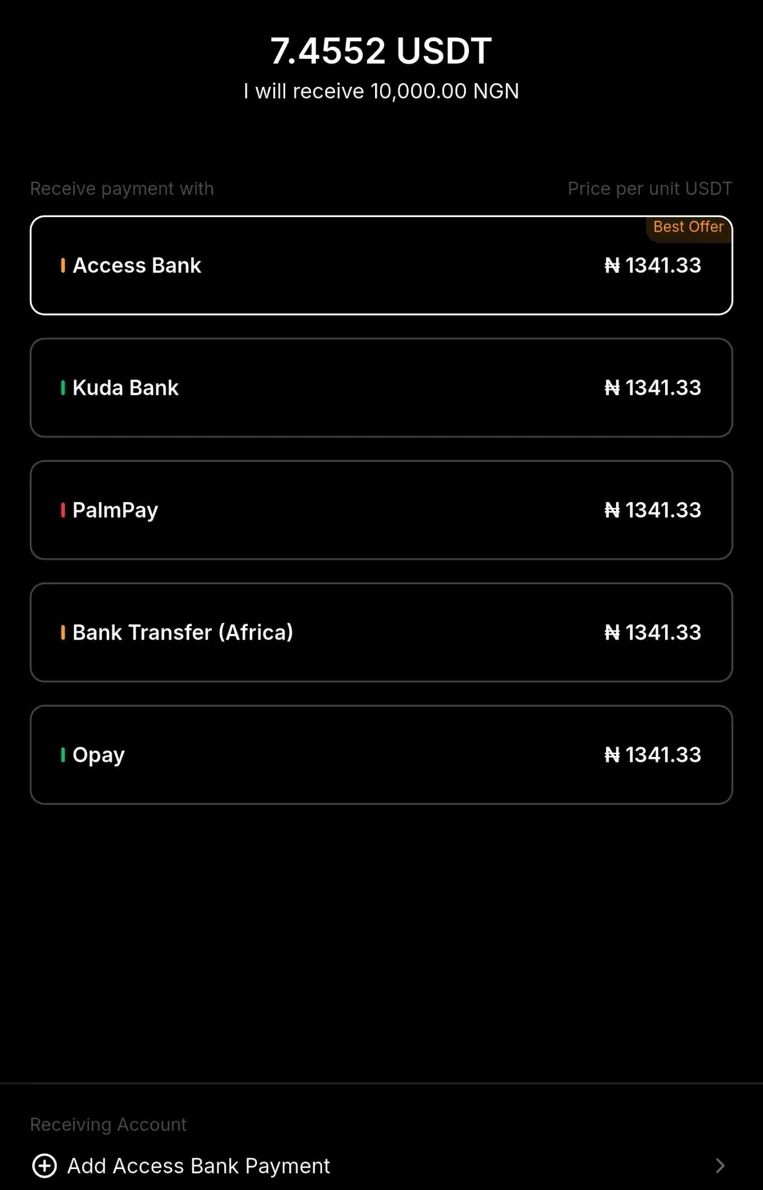 Selling USDT on the app's quick screen: every way to receive naira is a P2P method, all at the same price. 12 October 2026.
Notice what is missing from that list. Buying has a direct "Bank Transfer" option that is not P2P, but selling does not. Every way to receive naira, from Access Bank to PalmPay, was a P2P method, and all of them paid the same ₦1,341.33. So whichever button you press, naira leaves Bybit through another user.
For most people the first route is the practical one, so most of what follows is about doing it safely.
Getting the coins ready
If you hold Bitcoin, swap it to USDT first on the spot market, using BTC/USDT and Sell. The spot fee for regular users is 0.1%.
Next, check where the USDT sits. Bybit keeps balances in more than one account inside your login, and P2P may not see coins that are sitting in your trading account. If the P2P screen does not show your USDT, use Transfer to move it. Transfers between your own Bybit accounts are internal and do not cost a network fee.
Finally, add your payment details in the P2P settings. The bank account must be in your own name, matching your verified Bybit identity. On 12 October 2026, Bybit's P2P page also reminded NGN users that a bank-transfer payment method should include the KYC name, the bank name and the account number.
Selling USDT on P2P
- Open P2P and choose Sell, USDT and NGN.
- Compare the buy ads. Look at the price, the buyer's completed orders and completion rate, and whether they pay by the method you want.
- Enter the amount and open the order. Your USDT is now locked in escrow until you release it.
- Wait for the buyer to pay within the time shown on the order, commonly 15 or 30 minutes.
- Open your own bank app. Ignore screenshots and SMS alerts. Look for the full amount in your available balance.
- Check that the sender's name matches the buyer's verified name on the order.
- Release the USDT. The app may ask for your 2FA code.
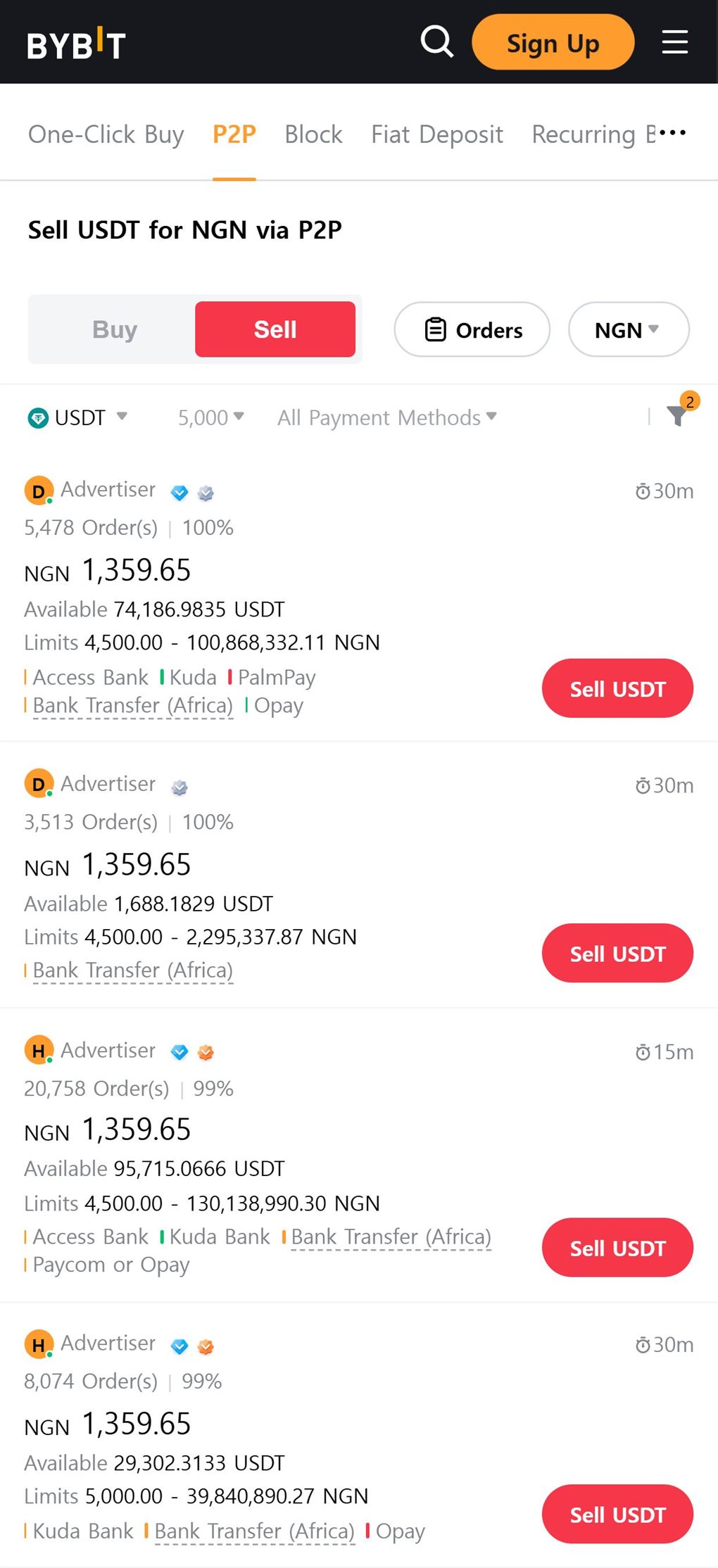 Bybit P2P sell ads for NGN on 12 October 2026, with payment methods. Advertiser names hidden.
Steps 5 and 6 are the whole game. The check takes a minute or two, and a real buyer will wait for it. Someone who will not wait is usually not a real buyer.
What lands in your account
Take the P2P sell price seen on 12 October 2026, about ₦1,360 per USDT. Selling 73.31 USDT at that price gives about ₦99,700. Bybit's P2P fee when you respond to an existing NGN buy ad is 0%. Your bank may charge its own fee for receiving, though many do not.
If you were starting from Bitcoin, the 0.1% spot fee to swap it into USDT comes off first. Prices move all day, and different buyers offer slightly different rates, so compare a few ads before you sell. A difference of ₦3 per USDT on 500 USDT is ₦1,500, which is more than any fee in this example.
When the payment looks wrong
Three situations come up again and again.
The first is money from a different name. Do not release. Payments from third parties are the classic way stolen money is passed to an innocent seller, and banks can freeze the receiving account when the victim reports it. Ask the buyer to cancel and refund the account it came from. If they will not, open Order Dispute from the order page.
The second is a part payment. Wait until the full amount is in your balance. Some scams split a payment so the seller loses track of what has arrived.
The third is a buyer who says they paid when nothing is there. Bank transfers can be slow, so give it time and keep talking inside the order chat. Do not release on the strength of a screenshot. If the timer runs out, the appeal process exists for exactly this. Bybit's fast track handles "I was not paid" cases in about 15 minutes, and you can appeal up to 5 calendar days after an order closes.
Why accounts get frozen, and how to lower the risk, is explained in Why Your Bank Account Got Frozen After a Crypto Trade.
Selling larger amounts
Banks set daily limits on transfers and may look more closely at large or unusual payments into an account. Before you sell a large amount, ask your own bank what its limits are. Keep a clear record of every sale, so that if your bank asks where the money came from, you can show the order, the chat and the receipt.
Sending coins to another platform instead
Some people send USDT or Bitcoin from Bybit to a local platform that pays naira directly. If you go this way, check the receiving platform's status and rules first, on sec.gov.ng and on its own site.
Then copy the deposit address from the receiving platform and choose the same network on Bybit. A wrong network can mean a permanent loss. Send a small test amount before the rest, and expect a network fee, shown on the withdrawal screen before you confirm. How to Verify a Crypto Address Before Sending covers the checks in detail.
Keep a record of every sale
For each sale, save the order ID, the date, the amount of USDT, the naira received and a copy of the chat. It feels like paperwork until the day someone asks. Records help with bank questions, and with tax. The Nigeria Tax Act 2025 took effect on 1 January 2026, and reports say crypto gains now fall within the income tax system, so check the official guidance or ask a tax adviser.
New to Bybit? You can open a Bybit account here (affiliate link) and check the new-user rewards on the sign-up page. How the P2P market works, from both sides, is in Bybit P2P in Naira.
Join through our link: get at least 20 USDT in sign-up rewards and 20% off trading fees.
Open a Bybit account and see new-user rewards(affiliate link)Sources
- Bybit Help Centre: P2P on Bybit, Fees Explained
- Bybit Help Centre: List of Restricted Issuing Countries for Fiat Service
- Bybit Help Centre: How to Submit an Appeal for Your P2P Order
- Bybit Help Centre: How to Transfer Assets on Bybit
- Bybit P2P: Sell USDT for NGN (ads viewed 12 October 2026)
- Bybit app (Android), Buy/Sell screen viewed 12 October 2026