How to Use Bybit in Nigeria: A Plain Guide for First-Timers
You have naira, you want your first Bitcoin, and Bybit keeps coming up. The usual route is to open an account, verify your identity, turn on two-factor login, buy USDT with naira on P2P, then swap it for Bitcoin. On 12 October 2026 naira users who responded to P2P ads paid no P2P fee and spot trades cost 0.1%, but read the risks before you put money in.
In this guide
- What to have ready
- How the whole thing fits together
- Step 1: Create your account
- Step 2: Verify your identity (KYC)
- Step 3: Secure your account
- Step 4: Buy USDT with naira on P2P
- Step 5: Move your USDT to the trading account
- Step 6: Swap USDT for Bitcoin
- Step 7: Keep it or move it
- What ₦50,000 actually buys
- The fees in one place
- When something goes wrong
- Before your first trade
The first time you open a big exchange app, it looks like an aeroplane cockpit. Charts, futures, bots, earn products, banners. Almost none of it matters for your first Bitcoin. What matters is a short path through about four screens, done in the right order and without rushing.
That path is what follows, from the first download to your first Bitcoin, using the route most Nigerian users take. Facts about fees and rules come from Bybit's own help centre and were checked on 12 October 2026. App menus can look slightly different between versions.
What to have ready
Start with money you can afford to lose. A small first amount, such as ₦5,000 to ₦20,000, is enough to learn every step. You will also need an original ID: an international passport, national ID or driver's licence. Bybit says users in Nigeria can also verify with BVN or NIN.
You need a bank or payment-app account in your own name, and an authenticator app on your phone, such as Google Authenticator. Then give yourself ten quiet minutes for each P2P trade. Rushing is how mistakes happen.
Last, know the risks before you start, not after. Is Bybit Safe in Nigeria? covers the regulatory uncertainty and the 2025 hack.
How the whole thing fits together
The route is naira → USDT → Bitcoin. You buy USDT, a dollar-linked token, with naira from another user on P2P. Then you swap the USDT for Bitcoin on the spot market. Two hops, not one.
There is also a shortcut. The app's Buy / Sell screen lets you buy USDT with naira by Bank Transfer, straight from Bybit rather than from another user. In the Bybit app on 12 October 2026 it was marked "Recommended" and quoted about ₦1,373 per USDT, with a ₦25 fee. At the same moment the cheapest P2P ads asked ₦1,357 to ₦1,363. That gap is about 1%, or roughly ₦10,000 on ₦1,000,000. The shortcut saves you choosing a seller, and it costs you for that. This guide uses P2P, because it was cheaper.
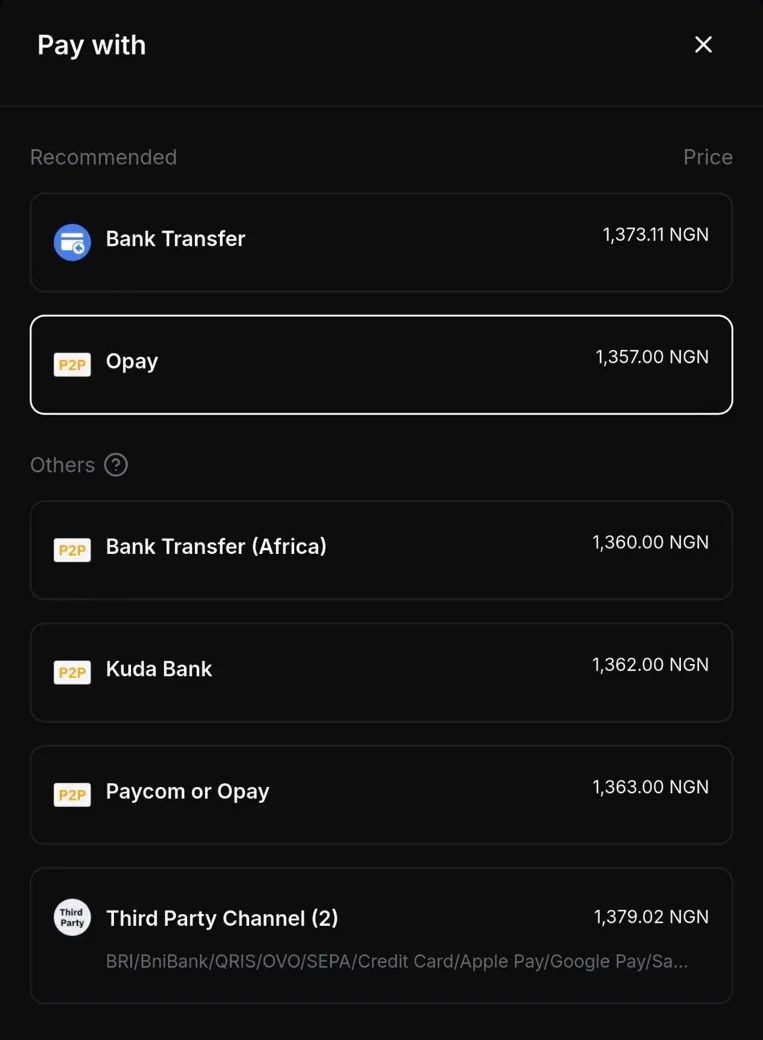 Payment options for buying USDT with naira in the Bybit app, 12 October 2026.
One more thing confuses nearly everyone. Bybit has more than one account inside your account. Your balance can sit in different places, such as the Funding Account and the Unified Trading Account. If coins you bought do not show up where you expect, they are usually in the other account, and Transfer moves them. This is the most common reason beginners think their USDT has "disappeared".
Step 1: Create your account
- Download the app from the official app store, or type the Bybit website address yourself. Never use a link from a stranger. Fake Crypto Apps and Websites shows what the copies look like.
- Sign up with your email (or phone number) and a long password that you use nowhere else.
- Enter the verification code Bybit sends you.
If you decide to use Bybit, you can open a Bybit account here (affiliate link) and check the new-user rewards on the sign-up page. Our Affiliate Disclosure explains the link. There is more detail on this step in How to Sign Up on Bybit.
Step 2: Verify your identity (KYC)
Bybit requires identity verification before your first P2P trade. The basic level (Standard, also shown as Lv. 1) asks for an original government-issued ID with your photo, name, date of birth and document number, or BVN/NIN for users in Nigeria. It also asks for a facial recognition scan. Higher levels ask for more, such as proof of address dated within the last three months, and allow larger limits.
Rejections are usually about small things. Use the original, physical document, because scans, screenshots and photocopies are not accepted. Make sure all four corners are visible and there is no glare. Your account name must match your document exactly. And Bybit allows one verified account per person, so do not open a second one to "try again".
The full walk-through is in Bybit KYC in Nigeria.
Step 3: Secure your account
Do this before you put any money in:
- Turn on two-factor authentication (2FA) with an authenticator app, and write the backup key on paper. How to Set Up 2FA on Bybit has the screens.
- Set an anti-phishing code in the security settings. Real emails from Bybit will then show your code, so fake ones are easier to spot.
- Check the list of logged-in devices and remove any you do not recognise.
Nobody from Bybit will ever ask for your password, 2FA code or recovery details. Anyone who does is not Bybit, as Fake Bybit Support explains.
Step 4: Buy USDT with naira on P2P
This is the step with the most moving parts, and the one where your own attention matters most.
- Open P2P, choose Buy, USDT and NGN.
- Filter by your payment method. On 12 October 2026, NGN ads listed bank transfer and apps such as OPay, PalmPay and Kuda, plus banks such as GTBank, UBA, Access Bank, First Bank, Fidelity and FCMB. Listed is not the same as allowed: OPay, PalmPay and Moniepoint each told customers in 2024 not to use their accounts for crypto trading, so read Can You Buy Bitcoin with OPay? before paying from one of them.
- Choose an ad carefully (more on that below).
- Enter the amount and place the order. The seller's USDT is now held in escrow.
- Pay the exact amount to the account shown in the order, in the seller's verified name. Do not pay any other account.
- Tap Payment Completed only after you have actually paid.
- Wait for the seller to release the USDT. Do not cancel after paying.
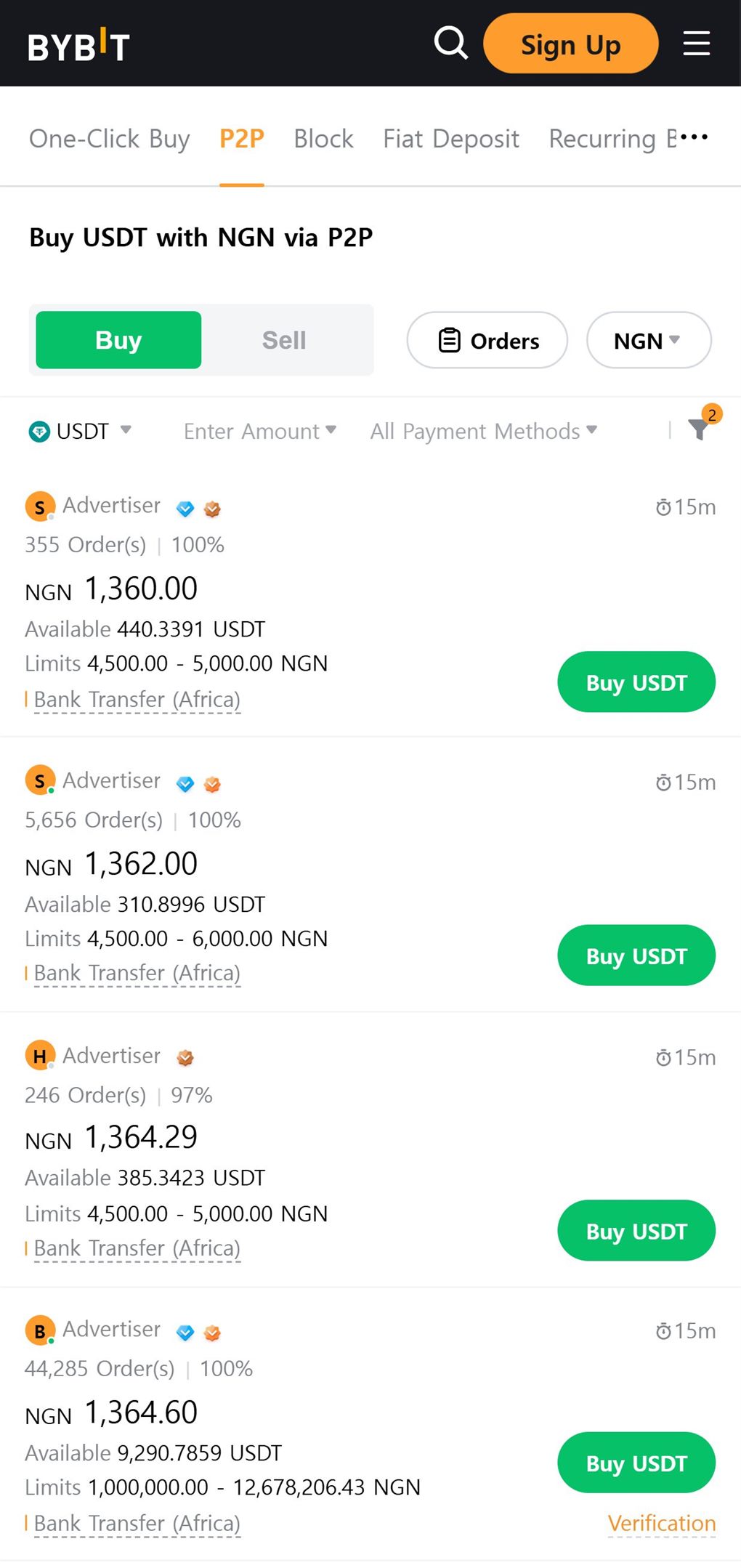 Bybit P2P buy ads for NGN on 12 October 2026. Advertiser names hidden.
Choosing the ad is where I would spend most of your ten minutes. Start with the price per USDT and compare it with today's naira rates. Then check the limits, the smallest and largest amount the seller accepts. Many NGN ads started at around ₦4,500 to ₦5,000; others required ₦500,000 or more. Look at completed orders and completion rate, and prefer sellers with many trades and a high rate. A Verification label, which many experienced advertisers show, is one more signal. Finally, note the payment time limit, often 15 or 30 minutes, and make sure your bank can move inside it.
If the seller does not release, open the order and choose Order Dispute (the appeal). Bybit says simple cases, such as "I paid but the coins were not released", go through a fast track of about 15 minutes, while other cases can take more than 48 hours. You can appeal during the order or within 5 calendar days after it closes.
For a closer look at P2P, read Bybit P2P in Naira and How to Buy USDT with Naira.
Step 5: Move your USDT to the trading account
Check where your USDT landed. If it does not show on the spot trading screen, use Transfer to move it into the account used for trading. Transfers between your own Bybit accounts are internal and do not go on the blockchain, so there is no network to choose and nothing to lose here.
Step 6: Swap USDT for Bitcoin
- Open the spot trading screen (usually under Trade → Spot) and choose BTC/USDT.
- Select Buy.
- Choose an order type. A market order buys straight away at the best available price. A limit order buys only at your chosen price or better, so it may not fill.
- Enter how much USDT to spend, check the summary and confirm.
The spot fee for regular users is 0.1% on most pairs, taken from the coin you receive. For a first small buy, a market order is the simpler choice. How to Buy Bitcoin with USDT and Market Orders vs Limit Orders go deeper.
Step 7: Keep it or move it
Now you own some Bitcoin, and you have a choice. Keeping it on Bybit is convenient for trading but carries exchange risk. Moving it to your own wallet removes exchange risk but makes you responsible for your recovery phrase. Crypto Wallets Explained sets out that trade-off.
If you do move it, always choose the matching network and send a small test first. How to Verify a Crypto Address shows how to check the address before you press send.
And if you want to turn it back into naira later, How to Withdraw from Bybit to a Nigerian Bank Account covers the reverse trip.
What ₦50,000 actually buys
Here is the whole route with real numbers, using rates checked on 12 October 2026 (USDT about ₦1,364 on P2P, Bitcoin about $83,390):
| Step | What happens | Result |
|---|---|---|
| Buy USDT on P2P | ₦50,000 ÷ ₦1,364 | 36.66 USDT |
| P2P fee | 0% for users who respond to an ad | 36.66 USDT |
| Swap for Bitcoin | 36.66 ÷ $83,390, minus 0.1% fee | 0.00043914 BTC (about 43,900 satoshis) |
| Value at the market price that day | about ₦48,740 |
The total cost was about 2.5%, and almost all of it came from the P2P rate, not from fees. That surprises most people. Fees get the attention, but the rate you accept on P2P usually costs more. Prices move every minute, so your result will be different. For how this compares with other methods, see How to Buy Bitcoin in Nigeria.
The fees in one place
| Fee | Amount (checked 12 October 2026) |
|---|---|
| P2P, if you respond to an existing NGN ad | 0% |
| P2P, if you post your own buy ad | 0.25% to 0.3%, by advertiser level |
| Spot trading, regular users | 0.1% |
| Transfers between your own Bybit accounts | None |
| Withdrawing crypto to another wallet | A network fee, shown before you confirm |
| Your bank or payment app | Their own charges, if any |
Bybit Fees Explained goes through each one.
When something goes wrong
The most stressful moment is paying and then watching the seller do nothing. If that happens, do not cancel the order. Message the seller in the order chat, then open Order Dispute with your payment proof. If the timer ran out but you had already paid, open Order Dispute straight away and upload your proof of payment. Keep all messages in the platform chat.
If your KYC was rejected, read the reason shown. Usually the photo was unclear, cropped or a copy, or the name did not match. Fix it and try again with the original document.
If your USDT is not on the trading screen, it is probably in the other account. Use Transfer.
If the Bybit website will not open, that may not be your phone. Access to some exchange websites has been restricted on Nigerian networks. We do not recommend using a VPN, and Is Bybit Blocked in Nigeria? explains why.
If you sent crypto on the wrong network, do not pay anyone who offers to recover it. Those offers are almost always a second scam. I Sent Crypto on the Wrong Network covers what you can actually do.
Before your first trade
After years of trading, I still treat every new platform the same way: small first, records of everything, and no conversations outside the app. On P2P that means staying inside the platform for every message and payment, never releasing coins or marking "paid" until money has really moved, and never sharing your password, 2FA code or recovery phrase. Anyone who contacts you first claiming to be support can be ignored.
Read P2P Scams in Nigeria once, and keep the P2P Safety Checklist open while you trade.
Join through our link: get at least 20 USDT in sign-up rewards and 20% off trading fees.
Open a Bybit account and see new-user rewards(affiliate link)Sources
- Bybit Help Centre: How to Complete Individual Identity Verification (KYC)
- Bybit Help Centre: FAQ, Individual KYC
- Bybit Help Centre: Trading Fee Structure
- Bybit Help Centre: P2P on Bybit, Fees Explained
- Bybit Help Centre: How to Submit an Appeal for Your P2P Order
- Bybit Help Centre: FAQ, P2P Order Appeals
- Bybit Help Centre: How to Transfer Assets on Bybit
- Bybit Help Centre: List of Restricted Issuing Countries for Fiat Service
- Bybit P2P: Buy USDT with NGN (ads viewed 12 October 2026)
- Bybit app (Android), Buy/Sell screen viewed 12 October 2026
- CoinGecko Bitcoin price history (daily snapshot, 12 October 2026)